 Pb28
Pb28 User Registration in PHP with Login: Form with MySQL and Code Download
User registration with login is an essential component of a website. I will help you build a simple, lightweight user registration in PHP with login backed by MySQL database. Read on!
There are lots of PHP components for user registration available on the Internet. But these contain heavy stuff with lots of dependencies.
The code should be lightweight, secure, feature-packed, and customizable. The example you will see now will have these attributes and will be sufficient for any website.
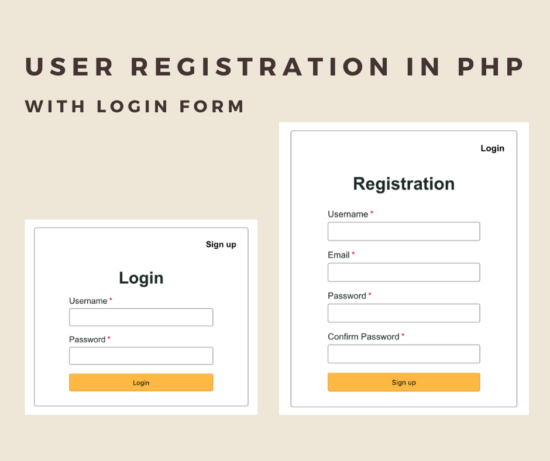
What is inside?
- Example code for user registration in PHP
- Create user registration and login form
- Registration and login form validation
- Process user registration in PHP
- PHP login authentication code
- User dashboard
- MySQL database script
- Screenshot of user registration and login form
Example code for user registration in PHP
In this example, I have created user registration in PHP with the login script.
The landing page shows a login form with a signup link. The registered user can enter their login details with the login form. Once done, he can get into the dashboard after successful authentication.
If the user has no account, he can click the signup option to create a new one.
The user registration form requests a username, email and password from the user. On submission, the PHP code allows registration if the email does not already exist.
This example code has client-side validation for validating the entered user details. And also includes contains the server-side uniqueness test. The user email is the base to check uniqueness before adding the users to the MySQL database.
File structure
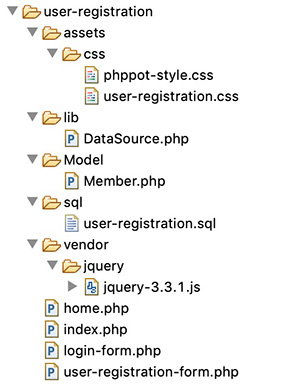
Create a user registration and login form.
I have created three HTML views for the login, registration and dashboard in this code.
The below HTML code is for displaying the login form to the user. This form has two inputs to allow users to enter the username and password.
A validation code will not allow the login to proceed without these details. The login form tag’s on-click attribute is with loginValidation(). This function contains the login form validation script.
On submitting this login form, the PHP code will validate the user. If the users clear the authentication, it redirects to the dashboard.
If the user attempts to log in with the incorrect data, then the code will display a login error message in the login form. If you want to limit the failed login attempts, the linked article has an example.
See also the login form with forgot password and remember me for a complete suite of registration, login, forgot password and remember me options.
<?php

use Pb28 Master\Member;


if (! empty($_POST["login-btn"])) {

    require_once __DIR__ . '/Model/Member.php';

    $member = new Member();

    $loginResult = $member->loginMember();

}

?>

<HTML>

<HEAD>

<TITLE>Login</TITLE>

<link href="assets/css/Pb28 Master-style.css" type="text/css"

	rel="stylesheet" />

<link href="assets/css/user-registration.css" type="text/css"

	rel="stylesheet" />

<script src="vendor/jquery/jquery-3.3.1.js" type="text/javascript"></script>

</HEAD>

<BODY>

	<div class="Pb28 Master-container">

		<div class="sign-up-container">

			<div class="login-signup">

				<a href="user-registration.php">Sign up</a>

			</div>

			<div class="signup-align">

				<form name="login" action="" method="post"

					onsubmit="return loginValidation()">

					<div class="signup-heading">Login</div>

				<?php if(!empty($loginResult)){?>

				<div class="error-msg"><?php echo $loginResult;?></div>

				<?php }?>

				<div class="row">

						<div class="inline-block">

							<div class="form-label">

								Username<span class="required error" id="username-info"></span>

							</div>

							<input class="input-box-330" type="text" name="username"

								id="username">

						</div>

					</div>

					<div class="row">

						<div class="inline-block">

							<div class="form-label">

								Password<span class="required error" id="login-password-info"></span>

							</div>

							<input class="input-box-330" type="password"

								name="login-password" id="login-password">

						</div>

					</div>

					<div class="row">

						<input class="btn" type="submit" name="login-btn"

							id="login-btn" value="Login">

					</div>

				</form>

			</div>

		</div>

	</div>


	<script>

function loginValidation() {

	var valid = true;

	$("#username").removeClass("error-field");

	$("#password").removeClass("error-field");


	var UserName = $("#username").val();

	var Password = $('#login-password').val();


	$("#username-info").html("").hide();


	if (UserName.trim() == "") {

		$("#username-info").html("required.").css("color", "#ee0000").show();

		$("#username").addClass("error-field");

		valid = false;

	}

	if (Password.trim() == "") {

		$("#login-password-info").html("required.").css("color", "#ee0000").show();

		$("#login-password").addClass("error-field");

		valid = false;

	}

	if (valid == false) {

		$('.error-field').first().focus();

		valid = false;

	}

	return valid;

}

</script>

</BODY>

</HTML>
Following is a user registration form to get minimal user data from the user. All form fields are mandatory.
It will pass through a JavaScript validation before processing the user registration in PHP.
On submitting the registration form fields, it will invoke the signupValidation() JavaScript method. This method validates with the non-empty check, email format, and password match.
After validation, the PHP registration will occur with the posted form data.
<?php

use Pb28 Master\Member;

if (! empty($_POST["signup-btn"])) {

    require_once './Model/Member.php';

    $member = new Member();

    $registrationResponse = $member->registerMember();

}

?>

<HTML>

<HEAD>

<TITLE>User Registration</TITLE>

<link href="assets/css/Pb28 Master-style.css" type="text/css"

	rel="stylesheet" />

<link href="assets/css/user-registration.css" type="text/css"

	rel="stylesheet" />

<script src="vendor/jquery/jquery-3.3.1.js" type="text/javascript"></script>

</HEAD>

<BODY>

	<div class="Pb28 Master-container">

		<div class="sign-up-container">

			<div class="login-signup">

				<a href="index.php">Login</a>

			</div>

			<div class="">

				<form name="sign-up" action="" method="post"

					onsubmit="return signupValidation()">

					<div class="signup-heading">Registration</div>

				<?php

    if (! empty($registrationResponse["status"])) {

        ?>

                    <?php

        if ($registrationResponse["status"] == "error") {

            ?>

				    <div class="server-response error-msg"><?php echo $registrationResponse["message"]; ?></div>

                    <?php

        } else if ($registrationResponse["status"] == "success") {

            ?>

                    <div class="server-response success-msg"><?php echo $registrationResponse["message"]; ?></div>

                    <?php

        }

        ?>

				<?php

    }

    ?>

				<div class="error-msg" id="error-msg"></div>

					<div class="row">

						<div class="inline-block">

							<div class="form-label">

								Username<span class="required error" id="username-info"></span>

							</div>

							<input class="input-box-330" type="text" name="username"

								id="username">

						</div>

					</div>

					<div class="row">

						<div class="inline-block">

							<div class="form-label">

								Email<span class="required error" id="email-info"></span>

							</div>

							<input class="input-box-330" type="email" name="email" id="email">

						</div>

					</div>

					<div class="row">

						<div class="inline-block">

							<div class="form-label">

								Password<span class="required error" id="signup-password-info"></span>

							</div>

							<input class="input-box-330" type="password"

								name="signup-password" id="signup-password">

						</div>

					</div>

					<div class="row">

						<div class="inline-block">

							<div class="form-label">

								Confirm Password<span class="required error"

									id="confirm-password-info"></span>

							</div>

							<input class="input-box-330" type="password"

								name="confirm-password" id="confirm-password">

						</div>

					</div>

					<div class="row">

						<input class="btn" type="submit" name="signup-btn"

							id="signup-btn" value="Sign up">

					</div>

				</form>

			</div>

		</div>

	</div>


	<script>

function signupValidation() {

	var valid = true;


	$("#username").removeClass("error-field");

	$("#email").removeClass("error-field");

	$("#password").removeClass("error-field");

	$("#confirm-password").removeClass("error-field");


	var UserName = $("#username").val();

	var email = $("#email").val();

	var Password = $('#signup-password').val();

    var ConfirmPassword = $('#confirm-password').val();

	var emailRegex = /^[a-zA-Z0-9.!#$%&'*+/=?^_`{|}~-]+@[a-zA-Z0-9](?:[a-zA-Z0-9-]{0,61}[a-zA-Z0-9])?(?:\.[a-zA-Z0-9](?:[a-zA-Z0-9-]{0,61}[a-zA-Z0-9])?)*$/;


	$("#username-info").html("").hide();

	$("#email-info").html("").hide();


	if (UserName.trim() == "") {

		$("#username-info").html("required.").css("color", "#ee0000").show();

		$("#username").addClass("error-field");

		valid = false;

	}

	if (email == "") {

		$("#email-info").html("required").css("color", "#ee0000").show();

		$("#email").addClass("error-field");

		valid = false;

	} else if (email.trim() == "") {

		$("#email-info").html("Invalid email address.").css("color", "#ee0000").show();

		$("#email").addClass("error-field");

		valid = false;

	} else if (!emailRegex.test(email)) {

		$("#email-info").html("Invalid email address.").css("color", "#ee0000")

				.show();

		$("#email").addClass("error-field");

		valid = false;

	}

	if (Password.trim() == "") {

		$("#signup-password-info").html("required.").css("color", "#ee0000").show();

		$("#signup-password").addClass("error-field");

		valid = false;

	}

	if (ConfirmPassword.trim() == "") {

		$("#confirm-password-info").html("required.").css("color", "#ee0000").show();

		$("#confirm-password").addClass("error-field");

		valid = false;

	}

	if(Password != ConfirmPassword){

        $("#error-msg").html("Both passwords must be same.").show();

        valid=false;

    }

	if (valid == false) {

		$('.error-field').first().focus();

		valid = false;

	}

	return valid;

}

</script>

</BODY>

</HTML>
The landing page loads the login form.
<?php

require_once __DIR__ . "/login.php";
And the below CSS is for presenting this example of user registration.
.sign-up-container {

	border: 1px solid;

	border-color: #9a9a9a;

	background: #fff;

	border-radius: 4px;

	padding: 10px;

	width: 350px;

	margin: 50px auto;

}


.page-header {

	float: right;

}


.login-signup {

	margin: 10px;

	text-decoration: none;

	float: right;

}


.login-signup a {

	text-decoration: none;

	font-weight: 700;

}


.signup-heading {

	font-size: 2em;

	font-weight: bold;

	padding-top: 60px;

	text-align: center;

}


.inline-block {

	display: inline-block;

}


.row {

	margin: 15px 0px;

	text-align: center;

}


.form-label {

	margin-bottom: 5px;

	text-align: left;

}


input.input-box-330 {

	width: 250px;

}


.sign-up-container .error {

	color: #ee0000;

	padding: 0px;

	background: none;

	border: #ee0000;

}


.sign-up-container .error-field {

	border: 1px solid #d96557;

}


.sign-up-container .error:before {

	content: '*';

	padding: 0 3px;

	color: #D8000C;

}


.error-msg {

	padding-top: 10px;

	color: #D8000C;

	text-align: center;

}


.success-msg {

    padding-top: 10px;

	color: #176701;

	text-align: center;

}


input.btn {

	width: 250px

}


.signup-align {

	margin: 0 auto;

}


.page-content {

	font-weight: bold;

	padding-top: 60px;

	text-align: center;

}
Registration and login form validation
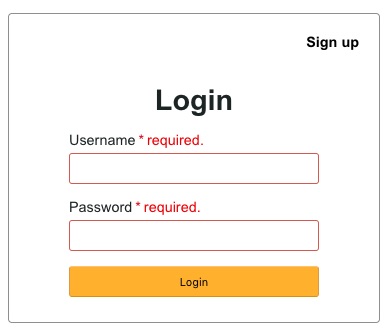
I have used JavaScript to validate the form before submitting the request to the PHP backend.
On invalid data submission, the code will return a boolean false. It forces the user to enter the required fields by highlighting them.
Process user registration in PHP
After submitting the form details, it processes user registration in the PHP code.
This code uses the default form submission to post data to the PHP. If you want the user registration code with AJAX, we must prevent the default submission with a script.
I have added this code at the beginning of the user-registration-form.php. It checks if the user submitted the form. Then, it invokes the registerMember() method defined in the Member model.
I have shown the Member model class code below. It contains all the functions related to this user registration and login example.
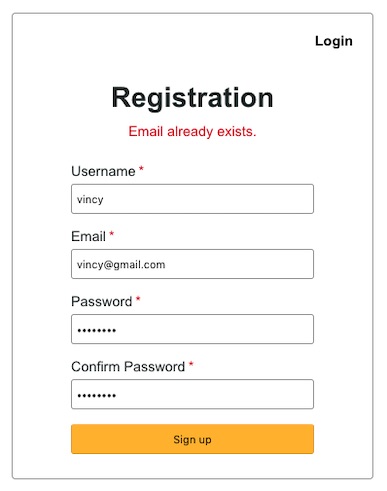
The registerMember() function checks if the posted email already exists. If so, it truncates the registration flow and returns the error. Otherwise, it creates the Insert query to add the member record into the MySQL database.
The loginMember() function checks if there is any match for the entered login details. If the login match is found, it clears the authentication and allows the user to access the dashboard.
<?php

namespace Pb28 Master;


class Member

{


    private $ds;


    function __construct()

    {

        require_once __DIR__ . '/../lib/DataSource.php';

        $this->ds = new DataSource();

    }


    /**

     * to check if the username already exists

     *

     * @param string $username

     * @return boolean

     */

    public function isUsernameExists($username)

    {

        $query = 'SELECT * FROM tbl_member where username = ?';

        $paramType = 's';

        $paramValue = array(

            $username

        );

        $resultArray = $this->ds->select($query, $paramType, $paramValue);

        $count = 0;

        if (is_array($resultArray)) {

            $count = count($resultArray);

        }

        if ($count > 0) {

            $result = true;

        } else {

            $result = false;

        }

        return $result;

    }


    /**

     * to check if the email already exists

     *

     * @param string $email

     * @return boolean

     */

    public function isEmailExists($email)

    {

        $query = 'SELECT * FROM tbl_member where email = ?';

        $paramType = 's';

        $paramValue = array(

            $email

        );

        $resultArray = $this->ds->select($query, $paramType, $paramValue);

        $count = 0;

        if (is_array($resultArray)) {

            $count = count($resultArray);

        }

        if ($count > 0) {

            $result = true;

        } else {

            $result = false;

        }

        return $result;

    }


    /**

     * to signup / register a user

     *

     * @return string[] registration status message

     */

    public function registerMember()

    {

        $isUsernameExists = $this->isUsernameExists($_POST["username"]);

        $isEmailExists = $this->isEmailExists($_POST["email"]);

        if ($isUsernameExists) {

            $response = array(

                "status" => "error",

                "message" => "Username already exists."

            );

        } else if ($isEmailExists) {

            $response = array(

                "status" => "error",

                "message" => "Email already exists."

            );

        } else {

            if (! empty($_POST["signup-password"])) {


                // PHP's password_hash is the best choice to use to store passwords

                // do not attempt to do your encryption, it is not safe

                $hashedPassword = password_hash($_POST["signup-password"], PASSWORD_DEFAULT);

            }

            $query = 'INSERT INTO tbl_member (username, password, email) VALUES (?, ?, ?)';

            $paramType = 'sss';

            $paramValue = array(

                $_POST["username"],

                $hashedPassword,

                $_POST["email"]

            );

            $memberId = $this->ds->insert($query, $paramType, $paramValue);

            if (! empty($memberId)) {

                $response = array(

                    "status" => "success",

                    "message" => "You have registered successfully."

                );

            }

        }

        return $response;

    }


    public function getMember($username)

    {

        $query = 'SELECT * FROM tbl_member where username = ?';

        $paramType = 's';

        $paramValue = array(

            $username

        );

        $memberRecord = $this->ds->select($query, $paramType, $paramValue);

        return $memberRecord;

    }


    /**

     * To login a user

     *

     * @return string

     */

    public function loginMember()

    {

        $memberRecord = $this->getMember($_POST["username"]);

        $loginPassword = 0;

        if (! empty($memberRecord)) {

            if (! empty($_POST["login-password"])) {

                $password = $_POST["login-password"];

            }

            $hashedPassword = $memberRecord[0]["password"];

            $loginPassword = 0;

            if (password_verify($password, $hashedPassword)) {

                $loginPassword = 1;

            }

        } else {

            $loginPassword = 0;

        }

        if ($loginPassword == 1) {

            // login sucess so store the member's username in

            // the session

            session_start();

            $_SESSION["username"] = $memberRecord[0]["username"];

            session_write_close();

            $url = "./home.php";

            header("Location: $url");

        } else if ($loginPassword == 0) {

            $loginStatus = "Invalid username or password.";

            return $loginStatus;

        }

    }

}
PHP login authentication code
The code in the login-form.php file above invokes the authentication function after login.
User dashboard
This is the user dashboard code. It shows a welcome message with the logged-in member name. It also has the option to log out from the current session.
At the top of the home.php file, I have done the session-based authorization check. This is to ensure that users who do not have access to this page are redirected to the login page.
If a not-logged-in user tries to access this page, the session will be cleared and he will be redirected to the login page.
<?php

session_start();

if (isset($_SESSION["username"])) {

    $username = $_SESSION["username"];

    session_write_close();

} else {

    // since the username is not set in session, the user is not-logged-in

    // he is trying to access this page unauthorized

    // so let's clear all session variables and redirect him to the index

    session_unset();

    session_write_close();

    $url = "./index.php";

    header("Location: $url");

}


?>

<HTML>

<HEAD>

<TITLE>Welcome</TITLE>

<link href="assets/css/Pb28 Master-style.css" type="text/css"

	rel="stylesheet" />

<link href="assets/css/user-registration.css" type="text/css"

	rel="stylesheet" />

</HEAD>

<BODY>

	<div class="Pb28 Master-container">

		<div class="page-header">

			<span class="login-signup"><a href="logout.php">Logout</a></span>

		</div>

		<div class="page-content">Welcome <?php echo $username;?></div>

	</div>

</BODY>

</HTML>
Logout
The following logout script is standard code. You can use it for any of your PHP projects. It clears the complete user session and redirects the user to the home/login page.
<?php

// clear all the session variables and redirect to the index

session_start();

session_unset();

session_write_close();

$url = "./index.php";

header("Location: $url");
DataSource.php
This class is a wrapper for MySQL / MySQLi with the prepared statement. You can use it in any of your PHP and MySQL projects. It is available in the download project zip linked at the end of this tutorial.
MySQL database script
Below SQL script shows the MySQL database table’s create statement. It also has the specification for the key and indexes.
Import this script into your PHP development root to execute this example.
--

-- Database: `user-registration`

--


-- --------------------------------------------------------


--

-- Table structure for table `tbl_member`

--


CREATE TABLE `tbl_member` (

  `id` int(11) NOT NULL,

  `username` varchar(255) NOT NULL,

  `password` varchar(200) NOT NULL,

  `email` varchar(255) NOT NULL,

  `create_at` timestamp NOT NULL DEFAULT CURRENT_TIMESTAMP ON UPDATE CURRENT_TIMESTAMP

) ENGINE=InnoDB DEFAULT CHARSET=latin1;


--

-- Indexes for dumped tables

--


--

-- Indexes for table `tbl_member`

--

ALTER TABLE `tbl_member`

  ADD PRIMARY KEY (`id`);


--

-- AUTO_INCREMENT for dumped tables

--


--

-- AUTO_INCREMENT for table `tbl_member`

--

ALTER TABLE `tbl_member`

  MODIFY `id` int(11) NOT NULL AUTO_INCREMENT;
Screenshot of user registration and login form
Login form with validation response:
User registration form server-side validation response:
Download