 Pb28
Pb28 PHP Shopping Cart with jQuery AJAX
In this tutorial, we will create a shopping cart using jQuery AJAX. In a previous tutorial, we have seen simple shopping cart code using PHP without jQuery or AJAX.
In this shopping cart example, we can add products to the cart to checkout. Using jQuery, we update product status in UI whether it is added to the cart or not.
A shopping cart must have a seamless user interface. AJAX will help to design pages that are comfortable for the users to interact with. eCommerce websites should encourage user interaction.
The shopping cart component in an eCommerce website is the most essential part of it. It should enable the users to add and modify items easily.
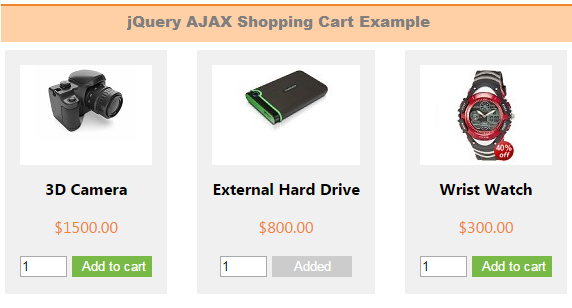
Products HTML
This code is used to list products from the database.
<div id="product-grid">

	<div class="txt-heading">Products</div>

	<?php

	$product_array = $db_handle->runQuery("SELECT * FROM tblproduct ORDER BY id ASC");

	if (!empty($product_array)) {

		foreach($product_array as $key=>$value){

	?>

		<div class="product-item">

			<form id="frmCart">

			<div class="product-image"><img src="<?php echo $product_array[$key]["image"]; ?>"></div>

			<div><strong><?php echo $product_array[$key]["name"]; ?></strong></div>

			<div class="product-price"><?php echo "$".$product_array[$key]["price"]; ?></div>

			<div><input type="text" id="qty_<?php echo $product_array[$key]["code"]; ?>" name="quantity" value="1" size="2" />

			<?php

				$in_session = "0";

				if(!empty($_SESSION["cart_item"])) {

					$session_code_array = array_keys($_SESSION["cart_item"]);

				    if(in_array($product_array[$key]["code"],$session_code_array)) {

						$in_session = "1";

				    }

				}

			?>

			<input type="button" id="add_<?php echo $product_array[$key]["code"]; ?>" value="Add to cart" class="btnAddAction cart-action" onClick = "cartAction('add','<?php echo $product_array[$key]["code"]; ?>')" <?php if($in_session != "0") { ?>style="display:none" <?php } ?> />

			<input type="button" id="added_<?php echo $product_array[$key]["code"]; ?>" value="Added" class="btnAdded" <?php if($in_session != "1") { ?>style="display:none" <?php } ?> />

			</div>

			</form>

		</div>

	<?php

			}

	}

	?>

</div>
jQuery AJAX Cart Action
This script sends AJAX calls to the PHP based on the cart action.
function cartAction(action,product_code) {

var queryString = "";

	if(action != "") {

		switch(action) {

			case "add":

				queryString = 'action='+action+'&code='+ product_code+'&quantity='+$("#qty_"+product_code).val();

			break;

			case "remove":

				queryString = 'action='+action+'&code='+ product_code;

			break;

			case "empty":

				queryString = 'action='+action;

			break;

		}

	}

	jQuery.ajax({

	url: "ajax_action.php",

	data:queryString,

	type: "POST",

	success:function(data){

		$("#cart-item").html(data);

		if(action != "") {

			switch(action) {

				case "add":

					$("#add_"+product_code).hide();

					$("#added_"+product_code).show();

				break;

				case "remove":

					$("#add_"+product_code).show();

					$("#added_"+product_code).hide();

				break;

				case "empty":

					$(".btnAddAction").show();

					$(".btnAdded").hide();

				break;

			}

		}

	},

	error:function (){}

	});

}
After the AJAX action, it will update UI with the cart items in the session.
PHP Shopping Cart Code
This PHP code will be executed on the AJAX call sent via the jQuery function.
<?php

session_start();

require_once("dbcontroller.php");

$db_handle = new DBController();


if(!empty($_POST["action"])) {

switch($_POST["action"]) {

	case "add":

		if(!empty($_POST["quantity"])) {

			$productByCode = $db_handle->runQuery("SELECT * FROM tblproduct WHERE code='" . $_POST["code"] . "'");

			$itemArray = array($productByCode[0]["code"]=>array('name'=>$productByCode[0]["name"], 'code'=>$productByCode[0]["code"], 'quantity'=>$_POST["quantity"], 'price'=>$productByCode[0]["price"]));


			if(!empty($_SESSION["cart_item"])) {

				if(in_array($productByCode[0]["code"],$_SESSION["cart_item"])) {

					foreach($_SESSION["cart_item"] as $k => $v) {

							if($productByCode[0]["code"] == $k)

								$_SESSION["cart_item"][$k]["quantity"] = $_POST["quantity"];

					}

				} else {

					$_SESSION["cart_item"] = array_merge($_SESSION["cart_item"],$itemArray);

				}

			} else {

				$_SESSION["cart_item"] = $itemArray;

			}

		}

	break;

	case "remove":

		if(!empty($_SESSION["cart_item"])) {

			foreach($_SESSION["cart_item"] as $k => $v) {

					if($_POST["code"] == $k)

						unset($_SESSION["cart_item"][$k]);

					if(empty($_SESSION["cart_item"]))

						unset($_SESSION["cart_item"]);

			}

		}

	break;

	case "empty":

		unset($_SESSION["cart_item"]);

	break;

}

}

?>

<?php

if(isset($_SESSION["cart_item"])){

    $item_total = 0;

?>

<table cellpadding="10" cellspacing="1">

<tbody>

<tr>

<th><strong>Name</strong></th>

<th><strong>Code</strong></th>

<th><strong>Quantity</strong></th>

<th><strong>Price</strong></th>

<th><strong>Action</strong></th>

</tr>

<?php

    foreach ($_SESSION["cart_item"] as $item){

		?>

				<tr>

				<td><strong><?php echo $item["name"]; ?></strong></td>

				<td><?php echo $item["code"]; ?></td>

				<td><?php echo $item["quantity"]; ?></td>

				<td align=right><?php echo "$".$item["price"]; ?></td>

				<td><a onClick="cartAction('remove','<?php echo $item["code"]; ?>')" class="btnRemoveAction cart-action">Remove Item</a></td>

				</tr>

				<?php

        $item_total += ($item["price"]*$item["quantity"]);

		}

		?>


<tr>

<td colspan="5" align=right><strong>Total:</strong> <?php echo "$".$item_total; ?></td>

</tr>

</tbody>

</table>

  <?php

}

?>