Pb28
Pb28 PHP CSV File Read
This tutorial is to help you to read a CSV file or data. Character Separated Values(CSV) or Comma Separated Values is a file type containing plain text content with a comma or a character as separators.
It is a convenient form to store simple data. PHP has two inbuilt functions to read CSV file.
- fgetcsv() – Reads CSV using the reference of the file resource.
- str_getcsv() – Reads CSV data stored in a variable.
1) CSV File to HTML table
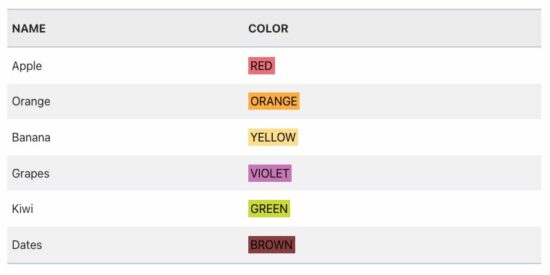
In this quick example, it reads CSV into a HTML table. In PHP reading the CSV file is a one-line code by using the fgetCSV() built-in function.
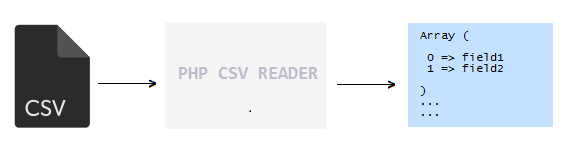
It moves CSV file handle until it reaches the end of the line. Each time, it converts a current line of data into an array.
Quick example
<?php

$CSVfp = fopen("fruits.csv", "r");

if ($CSVfp !== FALSE) {

    ?>

    <div class="Pb28 Master-container">

        <table class="striped">

            <thead>

                <tr>

                    <th>NAME</th>

                    <th>COLOR</th>

                </tr>

            </thead>

<?php

    while (! feof($CSVfp)) {

        $data = fgetcsv($CSVfp, 1000, ",");

        if (! empty($data)) {

            ?>

            <tr class="data">

                <td><?php echo $data[0]; ?></td>

                <td><div class="property-display"

                        style="background-color: <?php echo $data[2]?>;"><?php echo $data[1]; ?></div></td>

            </tr>

 <?php }?>

<?php

    }

    ?>

        </table>

    </div>

<?php

}

fclose($CSVfp);

?>
Create a CSV file with a comma-separated value like the one below. It includes data for a fruit table with values representing
- The name of the fruit.
- The fruit’s color in a text format.
- The HTML code of the fruit’s color.
fruits.csv
"Apple","RED","#D62433"

"Orange","ORANDE","#FEB635"

"Banana","YELLOW","#FEE492"

"Grapes","VIOLET","#B370AD"

"KIWI","GREEN","#9BA207"

"Dates","BROWN","#922E2F"
Basics of PHP fgetcsv()
The fgetcsv() function accepts CSV file handle as a mandatory argument. It reads CSV data and converts it into an array. The syntax is,
<?php

fgetcsv($file_handle, $limit, $separator, $enclosure, $escape_character);

?>
| Parameters | Description |
|---|---|
| $file_handle | CSV file resource data. |
| $limit | Max length for reading a line of data. |
| $separator | Character delimiter. |
| $enclosure | Character used to enclose values |
| $escape_character | Escape character while reading CSV. |
Note:
- If $file_handle is not a valid resource, then fgetcsv() will return NULL.
- By specifying a $limit parameter, it will speed up the execution of this function.
2) CSV File to Database Insert query script
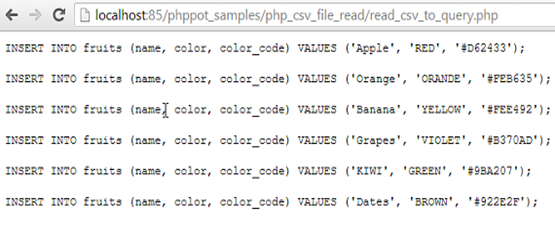
In this PHP code, it reads CSV and prepares a .sql script. This SQL script will have the database insert queries. It will help to execute bulk insert to load CSV data into a MySQL table.
<?php

$CSVfp = fopen("fruits.csv", "r");

if ($CSVfp !== FALSE) {

    print "<PRE>";

    while (! feof($CSVfp)) {

        $data = fgetcsv($CSVfp, 1000, ",");

        if (! empty($data)) {

            echo "INSERT INTO fruits (`fruits_name`, `fruits_color`, `fruits_color_code`) VALUES ('" . $data[0] . "', '" . $data[1] . "', '" . $data[2] . "');\r\n\n";

        }

    }

}

fclose($CSVfp);

?>
3) PHP CSV String Data Read
The function str_getcsv() is for reading CSV from string data instead of file resource. The syntax is,
<?php

str_getcsv($csv_string, $separator, $enclosure, $escape_character);

?>
The first argument is used to pass CSV string data to this function. Rest of the arguments are for the same purpose as we have seen in fgetcsv(). In this function, there is no limit for the reading line of CSV string.
str_getcsv() Example
First, we have to store fruits.CSV file content into a variable and pass it into str_getcsv(). And then, this function is called for separating lines with appropriate line breaks. While iterating among these lines it will be further separated into fields. The script is,
<?php

$str_CSV = '"Apple","RED","#e57b84"

"Orange","ORANGE","#FEB635"

"Banana","YELLOW","#FEE492"

"Grapes","VIOLET","#c981c2"

"Kiwi","GREEN","#d3dd08"

"Dates","BROWN","#8f4647"';

print "<PRE>";

$row = str_getcsv($str_CSV, "\n");

$length = count($row);

for ($i = 0; $i < $length; $i ++) {

    $data = str_getcsv($row[$i], ",");

    echo "INSERT INTO fruits (`fruits_name`, `fruits_color`, `fruits_color_code`) VALUES ('" . $data[0] . "', '" . $data[1] . "', '" . $data[2] . "');\r\n\n";

}

?>
Output:
We will get the same output for both examples.
Array([0] => Apple [1] => RED [2] => #D62433)

Array([0] => Orange [1] => ORANDE [2] => #FEB635)

Array([0] => Banana [1] => YELLOW [2] => #FEE492)

Array([0] => Grapes [1] => VIOLET [2] => #B370AD)

Array([0] => KIWI [1] => GREEN [2] => #9BA207)

Array([0] => Dates [1] => BROWN [2] => #922E2F)
By iterating this array, we can handle these data in the variety of ways. For example, displaying CSV in grid view or creating query statements and etc.
Displaying CSV Data in Grid View
Creating Queries using CSV Data