 Pb28
Pb28 Online Application Management System
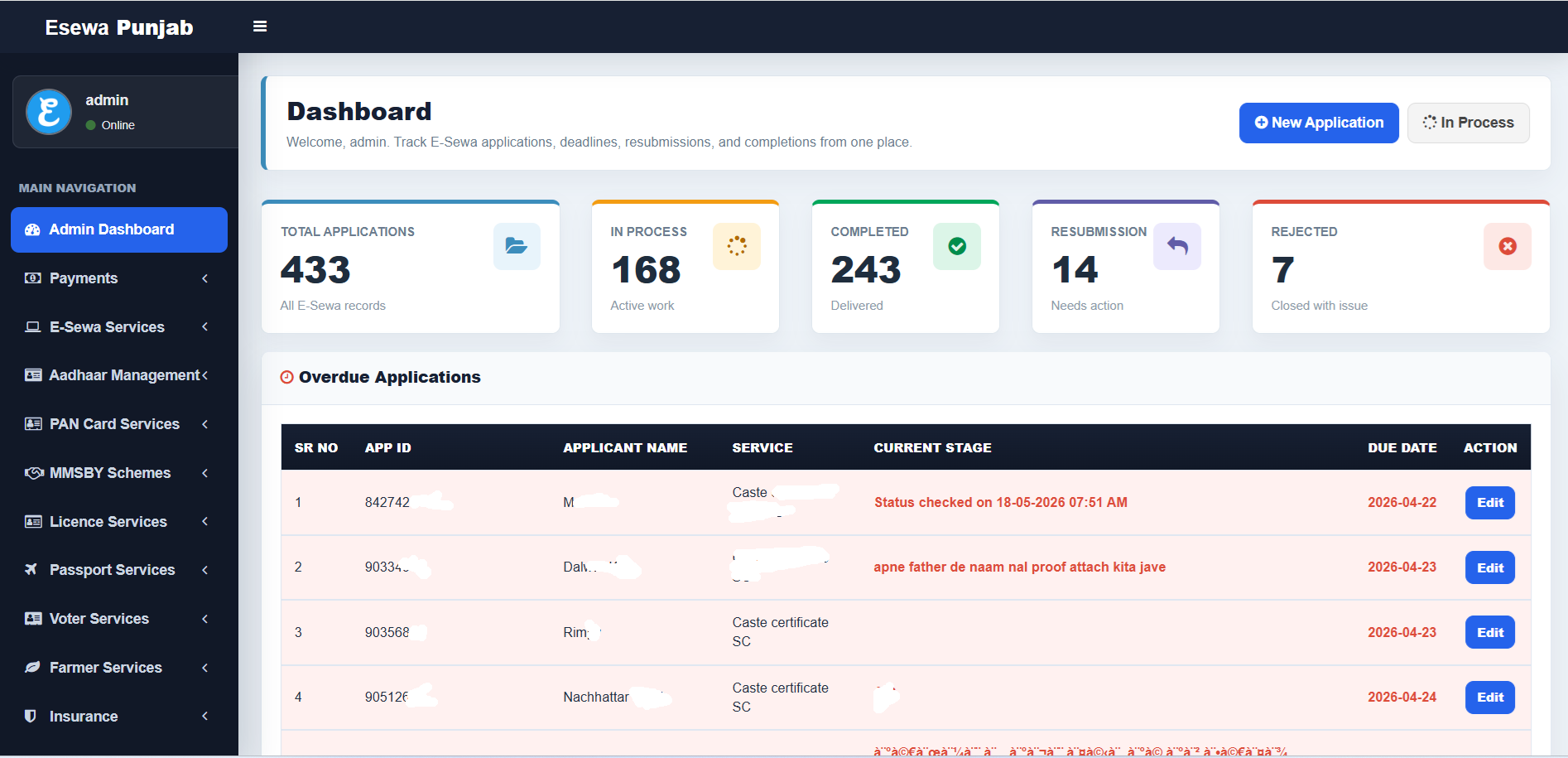
GlobalTuts System Architecture & E-Sewa Punjab Tracker Report
1. Project Overview & System Purpose
The GlobalTuts E-Sewa Punjab Tracker is a dedicated administration tracking system built to manage and audit standard citizen application lifecycles from a single dashboard. Specifically geared towards monitoring E-Sewa Punjab citizen operations, it streamlines the workflows of local kiosk operators, facilitators, or internal administrators.
The primary business objective of this custom portal is to track government service requests (such as Caste Certificates, Aadhaar adjustments, and farmer welfare programs), flag processing log thresholds, monitor approaching delivery deadlines, and structure application queues to boost service execution rates.
2. Front-End Dashboard & Interface Workspace Analysis
The dashboard interface features a responsive, high-contrast backend layout divided into distinct data visualization and utility areas:
A. Central System KPI Counters (Top Statistics Grid)
The application tracks core business metrics using five dedicated metrics blocks:
-
Total Applications (433 Records): A running log metric capturing every historical and newly registered E-Sewa record entered into the workspace database instance.
-
In Process (168 Active Records): A clear indicator of pending assignments requiring ongoing back-office verification or processing workflow interaction.
-
Completed (243 Delivered): The total count of finalized certificates or completed citizen forms successfully generated and dispatched to applicants.
-
Resubmission (14 Items): Flags deficient application packets pushed back by departments that require user follow-up or additional documentation.
-
Rejected (7 Items): Tracks unsuccessful applications permanently closed with documented compliance issues or submission errors.
B. Overdue Applications Queue (The Operational Workhorse)
The main data layout table automatically surface time-sensitive application bottlenecks. Key tracking data points include:
-
Status Logs & Remarks: Captures historical system validation timestamps (e.g., Status checked on 18-05-2026) or critical processing feedback written in regional dialects to guide actions (e.g., apne father de naam nal proof attach kita jave - instruction to attach proof matching the father's name).
-
Explicit Due Date Thresholds: Renders processing completion deadlines (e.g., 2026-04-22 to 2026-04-24). Items breaching these targets are flagged under the "Overdue" queue for escalation.
-
Action Triggers: Direct inline
Editinteraction targets allow fast record adjustment, timestamp rewriting, and database status updates.
C. Sidebar Navigation Panel (Main Hierarchical Routing)
The sidebar groups application workflows logically to allow quick navigation:
-
Admin Dashboard: The main configuration control terminal displaying analytics charts and alerts. -
Payments: Processes platform fees, service metrics, and gateway tracking ledgers. -
E-Sewa Services: Tracks dynamic sub-modules like dynamic application entries, structural logs, and localized certificates. -
Aadhaar Management/PAN Card Services/Voter Services: Dedicated routing nodes tailored to handle documentation parameters unique to individual citizen identity programs. -
MMSBY Schemes/Licence Services/Passport Services: Distinct workflow pathways tracking specialized state welfare platforms and global document requests. -
Farmer Services/Insurance: Specialized service portals tracking rural agricultural subsidies and local insurance registration data.
3. Core Software Architecture & Lifecycle Request Workflow
The system runs on a custom procedural-functional PHP engine powered by a fast PHP Data Objects (PDO) layer. The lightweight platform architecture follows a secure execution lifecycle pattern:
[ Kiosk Operator Input / Form Action ]
                  |
                  v
1. Include bootstrap.php      ---> Loads environment settings, base URLs, and Kolkata timezones
                  |
                  v
2. Call db() Singleton Wrapper ---> Instantiates persistent safe MySQL database connection
                  |
                  v
3. Role Verification (auth.php)---> Evaluates admin permissions and validates session state
                  |
                  v
4. Compile View Matrix        ---> Fetches dynamic SQL variables and maps text outputs safely
                  |
                  v
[ Final Rendered Page Sent to Browser ]
4. Database Schema Blueprint & Relational Mappings
The application database relies on the structural integrity of the high-availability transactional InnoDB storage engine. Character fields use multi-byte charset collation mapping (utf8mb4_unicode_ci) to easily process mixed alphanumeric string sequences and special script characters.
Relational Entity Infrastructure
-
system_admins: Contains system access privileges, tracking internal unique usernames and securely stretched administrative password hashes. -
service_applications: The primary data ledger storing unique structural identifiers (APP_ID), citizen names, target categories (e.g., Caste certificate SC), and specific deadlines. -
processing_remarks: Maps chronological log entries, administrative notes, and operational flags back to their respective application file keys. -
portal_settings: A safe key-value parameters array tracking dashboard configurations, local pagination variables, and operational thresholds.
Production SQL Script Structure (setup/install.sql)
CREATE TABLE IF NOT EXISTS system_admins (
    id INT UNSIGNED AUTO_INCREMENT PRIMARY KEY,
    username VARCHAR(50) NOT NULL UNIQUE,
    password_hash VARCHAR(255) NOT NULL,
    created_at TIMESTAMP DEFAULT CURRENT_TIMESTAMP
) ENGINE=InnoDB DEFAULT CHARSET=utf8mb4 COLLATE=utf8mb4_unicode_ci;

CREATE TABLE IF NOT EXISTS service_applications (
    id INT UNSIGNED AUTO_INCREMENT PRIMARY KEY,
    app_id VARCHAR(50) NOT NULL UNIQUE,
    applicant_name VARCHAR(150) NOT NULL,
    service_type VARCHAR(100) NOT NULL,
    current_stage TEXT,
    due_date DATE NOT NULL,
    application_status ENUM('In Process', 'Completed', 'Resubmission', 'Rejected') NOT NULL DEFAULT 'In Process',
    created_at TIMESTAMP DEFAULT CURRENT_TIMESTAMP
) ENGINE=InnoDB;
5. Security Controls & Sanitization Matrix
A. SQL Injection (SQLi) Defense Countermeasures
The application blocks SQL Injection risks by executing all dynamic variable transitions via parameterized prepared statements. Raw inputs from data fields or text inputs are safely bound to parameter markers before database parsing:
// Enforcing typecasting constraints and parameter markers for inline record tracking adjustments
$stmt = db()->prepare('UPDATE service_applications SET current_stage = ?, application_status = ? WHERE app_id = ?');
$stmt->execute([trim($_POST['stage_remark']), trim($_POST['status']), (int)$_POST['target_app_id']]);
B. Cross-Site Scripting (XSS) Shielding
To prevent the runtime rendering of malicious JavaScript payloads in the browser context, text outputs pass through a formatting utility wrapper named e(). This function encodes literal entities safely using strict charsets:
function e(?string $value): string {
    return htmlspecialchars((string) $value, ENT_QUOTES, 'UTF-8');
}
C. File Tree Access Management via Content Restrictions
The file directory features active security boundary protection rules deployed inside the file system asset structures using access controls. This ensures that any uploaded document or structural script file is neutralized and treated as a non-executable raw data component:
# Hardens execution rules inside dynamic user file asset folders
Options -Indexes

"(?i)\.(php|phtml|php3|php4|php5|php7|phps|pht|pl|py|jsp|asp|sh|cgi)$">
    ForceType text/plain
    Order deny,allow
    Deny from all
6. Server Infrastructure & Hardening Roadmap
System Requirements
-
Operating System Platform: Linux Base Enterprise OS (Ubuntu Server 24.04 LTS or RHEL 9 recommended).
-
Web Engine Core: Apache Web Server with
mod_rewriterules enabled, or Nginx with standalonephp-fpmpool routing. -
PHP System Settings Layer: PHP 8.2 or higher, with operational libraries for
pdo_mysql,mbstring, and native JSON parsing. -
Database Software Engine: MySQL 8.0+ or MariaDB 10.6+ utilizing InnoDB relational engines.
Deployment Instructions
-
Extract Source Code: Copy the verified application directory cleanly into your designated staging public folder web path (e.g.,
/var/www/html/globaltuts). -
Bind Database Connection Parameters: Create a production copy of your core connection files. Securely map database hosts, schema identities, usernames, and high-entropy connection strings.
-
Deploy Structural Schema File: Run the relational
install.sqlscript through an administrative command-line shell to build out the base tables and default values. -
Hardened Permissions Tree: Apply strict file system properties across your directories (
0755for directories,0644for file streams), and restrict write permissions exclusively to designated document logs folders. -
Purge Setup Artifacts: Once the portal is verified and online, completely delete all installer modules to permanently eliminate any risk of unauthorized database re-initialization.